

Playstation PSN KSA 20 USD Game Card Saudi Arabia
Buy Playstation on UQUID using Bitcoin, Ethereum, USDT, USDC, Solana, TRON, Binance Pay, Gate Pay, Bybit Pay, Kucoin Pay and hundreds of other cryptocurrencies. UQUID provides instant digital delivery, secure crypto checkout, and easy worldwide redemption for gaming, shopping, entertainment, and mobile services...
Description
Redemption Instructions
1. Open a Sony Entertainment Network account (or use an existing account). 2. From your PS4™, PS3™, PS Vita, or PSP system, or a personal computer, access PlayStation®Store. 3. Click the ‘Redeem Codes’ icon. 4. Enter the code at the bottom of this card. 5. Select “Confirm” to accept the Terms of Service. 6. For additional redemption instructions, please visitus.playstation.com/redemption. 7. Gift card does not expire.Terms of use
Visit https://www.playstation.com/en-sa/legal/psn-terms-of-service/
PlayStation
What is PlayStation
PlayStation is a video gaming brand that consists of five home video game consoles, two handhelds, a media center, and a smartphone, as well as an online service and multiple magazines.
PlayStation Store covers PlayStation 3, PSP, PS Vita and PlayStation 4.
How to redeem
A. Online Redemption
1. Go to PlayStation Store and log in to your account
2. Under your PlayStation ID, click on Redeem a Prepaid Card.
3. Insert the code and click continue to top up your wallet
B. Redeem on the PlayStation App
1. Open the PlayStation App
2. Go to the Store and select Redeem Codes
3. Enter the code and click continue
C. Redeem on your PS4 or PS5
1. Connect to your account
2. From the menu select PSN
3. Go to Account Information, Wallet, the Add Funds
4. Enter the code under Redeem Codes
D. Redeem on your PS3, PS Vita, or PSP
1. Connect to your account
2. From the Account Management or PlayStation Store menu, click on Redeem Codes
3. Enter the code and confirm
E. How to activate the PlayStation Key?
So, you just got a PlayStation Key from Uquid and can't wait to use it? This guide will walk you through the steps to ensure you can start using your PlayStation Key right away.
1. Go to https://store.playstation.com

2. Sign in to your PlayStation Network Account.
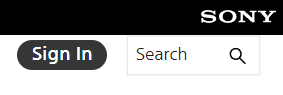
3. Click on the little happy face to open up a drop-down menu.
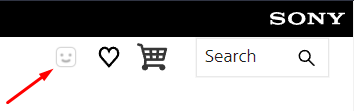
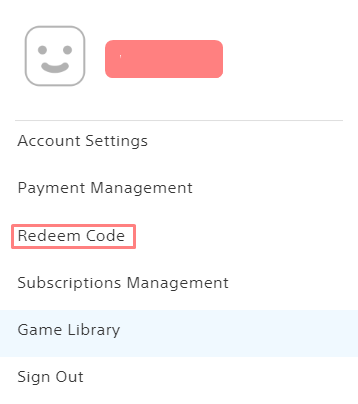
4. In the drop-down menu, you will see the "Redeem Code" option.
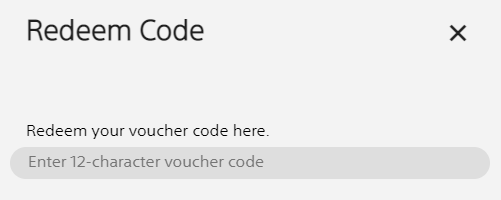
5. Enter the code you have received from your order and click "Continue". Just make sure to double-check carefully if there aren't any mistakes!
6. You will be prompted with a confirmation screen of the product which is about to be activated. Click "Done" to complete the process.
Restriction
Playstation Store Code codes are region and currency specific. Please check the currency and the region of your account before ordering this product.
No expiration date.
Terms & Policy
Your use of this “PlayStation™Store“ card (“Card”) constitutes your acceptance of these terms and any additional terms available at playstationnetwork.com/terms-of-service
Activated Cards can only be redeemed through an account subject to prior acceptance of the Terms of Service and User Agreement and applicable Privacy Policy available at playstationnetwork.com/terms-of-service
“PS5” and “PS4” consoles, personal computers, access to the internet, compatible hardware and software sold separately. Your account will only accept Cards from the country designated on your account. Card is not redeemable for cash, cannot be returned for cash or credit, and may not be used for any other purpose. Card will not be replaced if lost, destroyed, or stolen. Sony Interactive Entertainment LLC, its parent company, affiliated companies and licensors make no express or implied warranties with respect to Card, PSN or the availability of products or services. To the extent permitted by law, your sole and exclusive remedy is the replacement of Card.
All rights are reserved. Terms of Card may change without notice. Void where prohibited or restricted by law. No refunds from Sony Interactive Entertainment LLC. For assistance, visit support.playstation.com
PlayStation™Now is only available to U.S. residents and Canadian residents with a PSN account who are 18 years or older. Users who have not reached the legal age of majority in your jurisdiction need a parent or legal guardian’s consent to establish a PSN Account, and may not be able to access certain content or services. Use of PSN and PS Now is subject to the Terms of Service and User Agreement and applicable privacy policy, see www.playstation.com/en-us/network/legal/terms-of-service/High-speed broadband Internet service (5Mbs or greater) is required for download and access to certain content, features and benefits. User responsible for associated fees. PSN and PS Now features and offerings may change without notice, including but not limited to the removal of games from the subscription service. “PS4”, “PS3” and “PS2” systems all sold separately. Card is not redeemable for cash, cannot be returned for cash or credit, and may not be used for any other purpose. Card will not be replaced if lost, destroyed, orstolen.Sony Interactive Entertainment LLC, its parent company, affiliated companies and licensors make no express or implied warranties with respect to Card,PSN, PlayStation™Now, or the availability of products or services. To the extent permitted by law, your sole and exclusive remedy is the replacement of Card. For assistance, contactplaystation.com/helpme. “PlayStation”,“PlayStation Family Mark”, “PS4”, “PS3” and “PS2” are registered trade marks or trademarks, and “PSN” is a service mark of Sony Interactive Entertainment Inc.
什么是 游戏机
PlayStation 是一个视频游戏品牌,包括五台家用视频游戏机、两台手持设备、一个媒体中心和一部智能手机,以及一项在线服务和多本杂志。
PlayStation Store 涵盖 PlayStation 3、PSP、PS Vita 和 PlayStation 4。
如何兑换
网上兑换
1. 前往 PlayStation Store 并登录您的帐户
2. 在您的 PlayStation ID 下,单击兑换预付卡。
3. 输入代码并点击继续为您的钱包充值
在 PlayStation App 上兑换
1. 打开 PlayStation App
2. 前往商店并选择兑换代码
3.输入验证码,点击继续
在 PS4 或 PS5 上兑换
1.连接到您的帐户
2. 从菜单中选择 PSN
3.转到账户信息,钱包,添加资金
4. 在 Redeem Codes 下输入代码
在您的 PS3、PS Vita 或 PSP 上兑换
1.连接到您的帐户
2. 从账户管理或 PlayStation Store 菜单中,点击兑换代码
3.输入代码并确认
限制
Playstation Store Code 代码是特定于地区和货币的。订购此产品前,请检查您帐户的货币和区域。
没有有效期。
条款与政策
您使用此“PlayStation™Store”卡(“卡”)即表示您接受这些条款以及 playstationnetwork.com/terms-of-service 上提供的任何附加条款
激活卡只能通过事先接受服务条款和用户协议以及适用的隐私政策的帐户兑换,这些隐私政策可在 playstationnetwork.com/terms-of-service
“PS5”和“PS4”游戏机、个人电脑、互联网接入、兼容硬件和软件单独出售。您的账户将只接受来自您账户指定国家的银行卡。卡不可兑换现金,不可退回现金或信用卡,也不得用于任何其他目的。如果卡丢失、毁坏或被盗,将不予补发。 Sony Interactive Entertainment LLC、其母公司、关联公司和许可方对卡、PSN 或产品或服务的可用性不作任何明示或暗示的保证。在法律允许的范围内,您唯一的补救措施是更换卡片。
保留所有权利。卡的条款可能会更改,恕不另行通知。在法律禁止或限制的情况下无效。 Sony Interactive Entertainment LLC 不予退款。如需帮助,请访问 support.playstation.com
PlayStation™Now 仅适用于拥有 PSN 帐户且年满 18 岁的美国居民和加拿大居民。未达到您所在司法管辖区法定成年年龄的用户需要父母或法定监护人的同意才能建立 PSN 帐户,并且可能无法访问某些内容或服务。使用 PSN 和 PS Now 须遵守服务条款和用户协议以及适用的隐私政策,请参阅 www.playstation.com/en-us/network/legal/terms-of-service/高速宽带互联网服务(5Mbs或更高)需要下载和访问某些内容、功能和好处。用户负责相关费用。 PSN 和 PS Now 的功能和产品可能会更改,恕不另行通知,包括但不限于从订阅服务中删除游戏。 “PS4”、“PS3”和“PS2”系统均单独出售。卡不可兑换现金,不可退回现金或信用卡,也不得用于任何其他目的。如果卡丢失、毁坏或被盗,将不予更换。Sony Interactive Entertainment LLC、其母公司、关联公司和许可方对卡、PSN、PlayStation™Now 或产品或服务的可用性不作任何明示或暗示的保证。在法律允许的范围内,您唯一的补救措施是更换卡片。如需帮助,请访问 contactplaystation.com/helpme。 “PlayStation”、“PlayStation Family Mark”、“PS4”、“PS3”和“PS2”是注册商标或商标,“PSN”是 Sony Interactive Entertainment Inc. 的服务标志。
Question & Answer
1. Can I buy game cards with cryptocurrency on UQUID?
2. How fast is delivery on UQUID?
3. Do I need to create an account to buy game cards on UQUID?
4. Do game cards on UQUID have regional restrictions?
Review
Related Products
