

eBay 445 USD USA Gift Card
Buy eBay on UQUID using Bitcoin, Ethereum, USDT, USDC, Solana, TRON, Binance Pay, Gate Pay, Bybit Pay, Kucoin Pay and hundreds of other cryptocurrencies. UQUID provides instant digital delivery, secure crypto checkout, and easy worldwide redemption for gaming, shopping, entertainment, and mobile services...
Options:
Description
Redemption Instructions
During Checkout on eBay.com:1. Enter the 13-digit PIN, then click Apply.
2. Click Continue to proceed to PayPal.
3. Log in to your PayPal account.
4. Review the payment details and click Confirm and Pay.
Please note the 19 digit gift code is not required.
Terms and Conditions Instructions
eBay Gift Card Terms & Conditions:
Treat your eBay Gift Card like cash. Only redeemable to purchase items directly on eBay.com, where PayPal is accepted. To use this Gift Card, you must have a U.S. registered eBay account, a PayPal account, and a U.S. shipping address. After first use, your eBay Gift Card is non-transferrable. Not refundable or redeemable for cash unless required by law. Your eBay Gift Card never expires and there are no fees. Your eBay Gift Card is subject to full terms and conditions. Redemption limits apply.
To check balance, seek assistance, or read the full terms and conditions visit www.ebay.com/ebaygiftcard
Find items as unique as you are at: www.ebay.com/CoolGifts
Issued by eBay Gift Card Services, Inc., an Arizona corporation © 2018 eBay Inc.
eBay
What is eBay
If you love browsing eBay for great deals on vintage clothing, collector's baseball cards, or other hard-to-find items, an eBay gift card is the perfect way to give them exactly what they want — even if you don’t know what it is.
How to redeem
How To Redeem?
1. Click the Pay Now button.
2. If the seller offers more than one shipping option, select the one you want.
3. Enter the redemption code in the Redeem a Gift Card field.
4. Click the Apply button to see your new order total, and then click the Continue button.
5. On the next page, log in to your PayPal account.
6. Select a PayPal payment method, and then click the Continue button.
7. Check your order details, and then click the Confirm payment button.
eBay Gift Card Activation Guide
Step 1: Log in to your eBay account.
Step 2: At checkout, scroll to the bottom to find the "Gift cards, coupons, eBay Bucks" field;
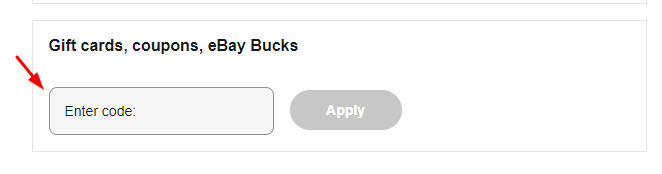
Step 3: Enter the eBay gift card code you received from Uquid then click on "Apply".
Restriction
You can use up to 4 gift card and/or promotion codes per transaction. The codes include eBay gift cards, eBay Bucks, and coupons
Gift cards are linked to your account on the first use. Once you use it, your card cannot be used with another eBay account.
Terms & Policy
eBay Gift Cards are non-refundable and cannot be redeemed for cash, unless required by law.
https://pages.ebay.com/gp/en-us/giftcard/terms_conditions.html
什么是 易趣網
如果您喜歡在 eBay 上瀏覽復古服裝、收藏家棒球卡或其他難以找到的物品的超值優惠,那麼 eBay 禮品卡是為他們提供他們想要的東西的完美方式——即使您不知道它是什麼是。
如何兑换
1. 單擊立即付款按鈕。
2. 如果賣家提供多種運輸方式,請選擇您想要的一種。
3. 在兌換禮品卡字段中輸入兌換代碼。
4. 單擊“應用”按鈕查看您的新訂單總數,然後單擊“繼續”按鈕。
5. 在下一頁上,登錄您的 PayPal 帳戶。
6. 選擇一種 PayPal 支付方式,然後單擊繼續按鈕。
7. 檢查您的訂單詳情,然後點擊確認付款按鈕。
限制
每次交易最多可以使用 4 個禮品卡和/或促銷代碼。這些代碼包括 eBay 禮品卡、eBay Bucks 和優惠券
禮品卡在首次使用時與您的帳戶相關聯。一旦您使用它,您的卡就不能與另一個 eBay 帳戶一起使用。
条款与政策
除非法律要求,否則 eBay 禮品卡不可退款且不可兌換現金。
https://pages.ebay.com/gp/en-us/giftcard/terms_conditions.html
Question & Answer
1. I bought a key by mistake (wrong platform / region / version or multiple copies) and didn’t use it. Can I get refund ?
2. The CD-key that I purchased doesn’t work or stopped working. What should I do?
- My key is invalid: If you see an error message indicating that your key may be invalid, please check for the following: Are you activating the product on the proper platform? Have you copied the key properly?
- My key is region locked: If you see an error message suggesting that your key code can’t be activated in your region, please make sure to check first if you purchased your key for the correct region (by checking the product page on uquid.com). Some of the products sold on Uquid.com have regional restrictions and can be activated only in certain regions or countries.
-My key has already been used:
If the error message suggests that your key code has been used already:
Log out of your account and log back in, then check your library again. If you tried to enter your key multiple times, it may be that you activated it already but didn’t see the game in your library yet;
If the key you are trying to activate is for a DLC, it could be listed separately from the main game in your library. Make sure to check your library for DLCs or start the game to see if the code didn’t work already for you.
- My key has been revoked:
If you receive an information that your key code has been deactivated by the developer of the game, please contact us immediately and let us know of what happened with your key.
3. I tried to pay, but my payment/transaction is still pending?
Because of that, we recommend that you never close the checkout window in your browser or go back from a payment that is already being processed in Uquid checkout. Closing your browser window while your payment is still pending can cause issues with it and as a result interrupt delivery of your order – we wouldn’t want that to happen.
4. My payment is completed, but it’s now stuck on “Verification in progress…”?
5. My payment/transaction was refunded. When and how will I receive my funds back?
6. I didn’t receive my CD-key or any e-mail. What should I do?
Double check the e-mail address that you entered in the shopping cart during your purchase
Check the status of your order in the "Orders history"
Make sure to check if you haven't perhaps purchased a pre-order
If you have checked all of the above and still couldn't find an e-mail regarding your purchase, please contact our support team by creating a ticket here
Review
Related Products
