

Walmart Gift Card - Cad 15 Gift Card Canada
Buy Walmart on UQUID using Bitcoin, Ethereum, USDT, USDC, Solana, TRON, Binance Pay, Gate Pay, Bybit Pay, Kucoin Pay and hundreds of other cryptocurrencies. UQUID provides instant digital delivery, secure crypto checkout, and easy worldwide redemption for gaming, shopping, entertainment, and mobile services...
Description
About Walmart Gift Card (CA)
Walmart Gift Cards (CA) can be used in Walmart stores, Sam's Club
locations in the United States, and Puerto Rico, and online at
Walmart.com and Samsclub.com. With a Walmart Gift Card, you get low
prices every day on thousands of popular products in stores or online.
You’ll find a wide assortment of top electronics, toys, home essentials,
and more. Plus, the cards don’t expire, and you never pay any fees.
How to redeem Walmart gift cards (CA)?
- During checkout you will reach the Payment Method screen
- Select Gift Card
- Add a new Gift Card or apply those already saved
- As cards are added, you will see them appear in your Purchase Summary
- If your order total is less than the amount on your Walmart Gift
Card, the remaining amount will be available on your card for future
purchases. If your order total is more than the amount on your Walmart
Gift Card, you will need to pay for the balance with additional gift
cards or a credit/debit card.
Walmart
What is Walmart
With a Walmart eGift Card, you get low prices every day on thousands of popular products in stores or online at Walmart.com. You’ll find a wide assortment of top electronics, toys, home essentials and more. Plus, cards don’t expire and you never pay any fees.
How to redeem
How To Redeem?
1. Go to your Walmart account
2. Click on the Account tab
3. Go to Payment Methods and add a new Gift Card
4. Enter the Gift Card information and confirm
Walmart Gift Card Activation Guide
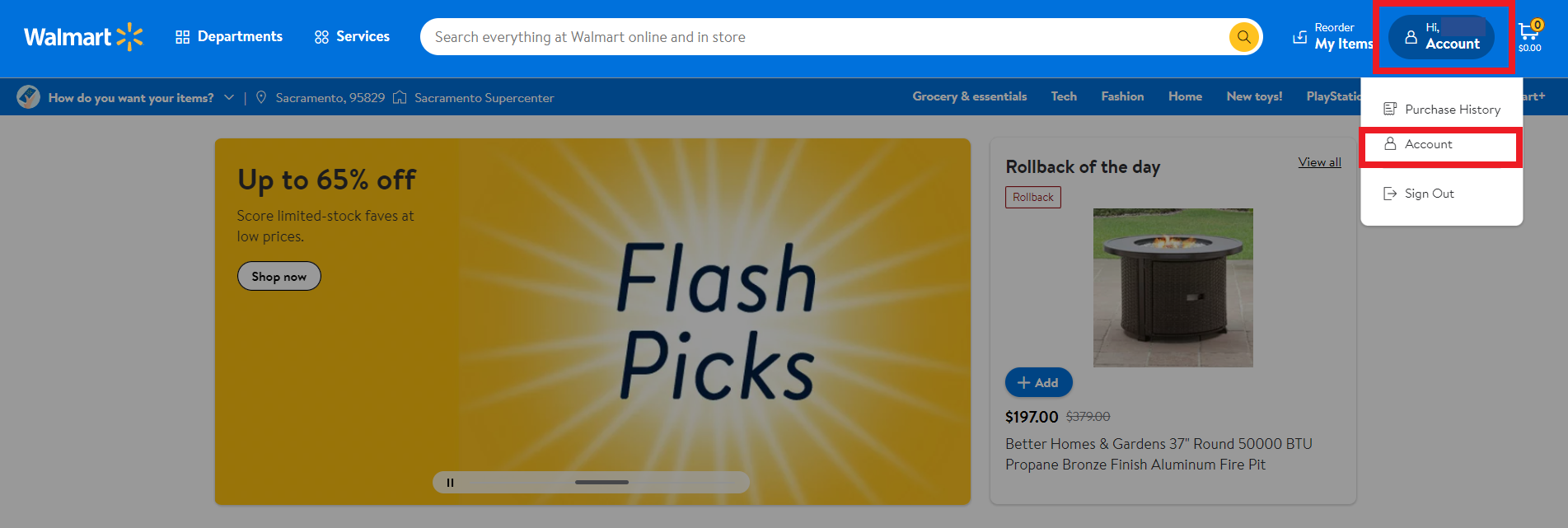
Step 1: Click on "Account" in the upper-right corner.
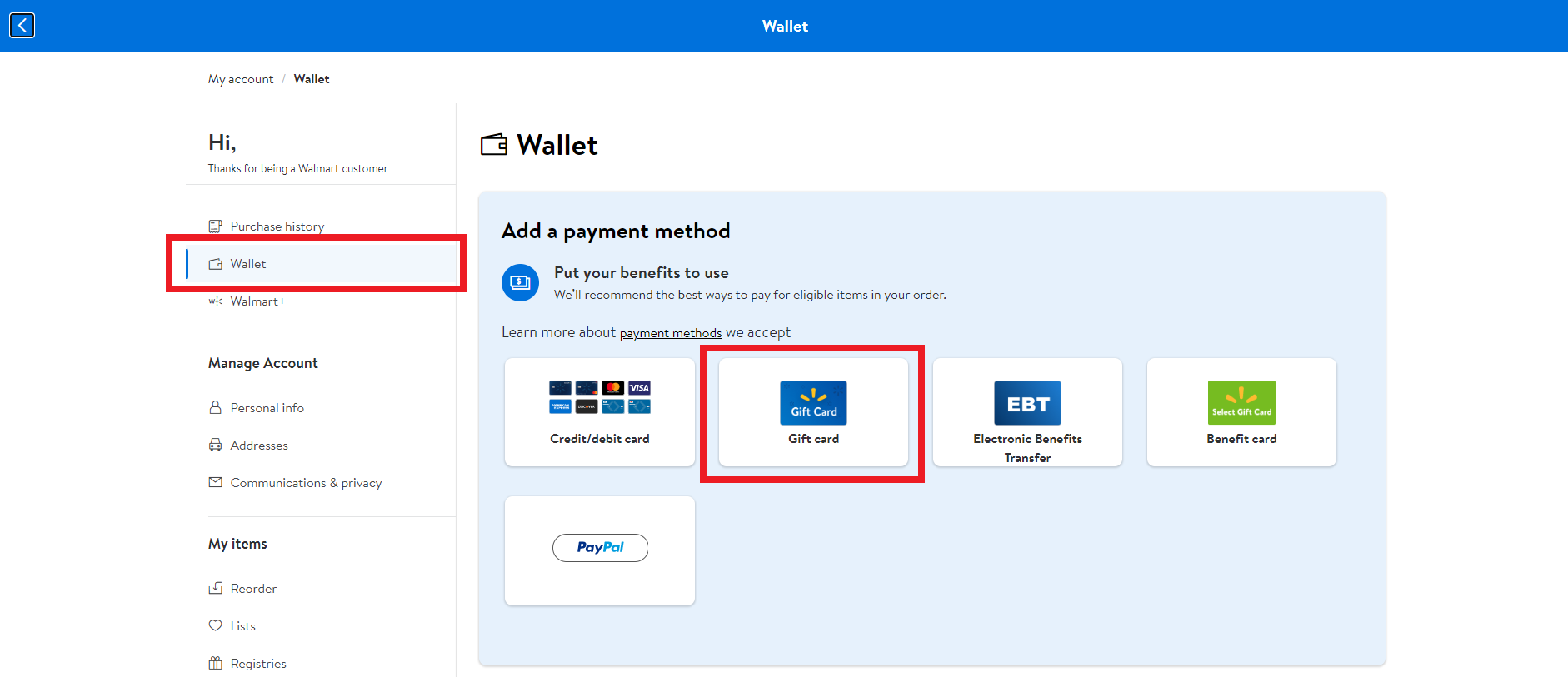
Step 2: Choose "Wallet" and then click on "Gift Card".
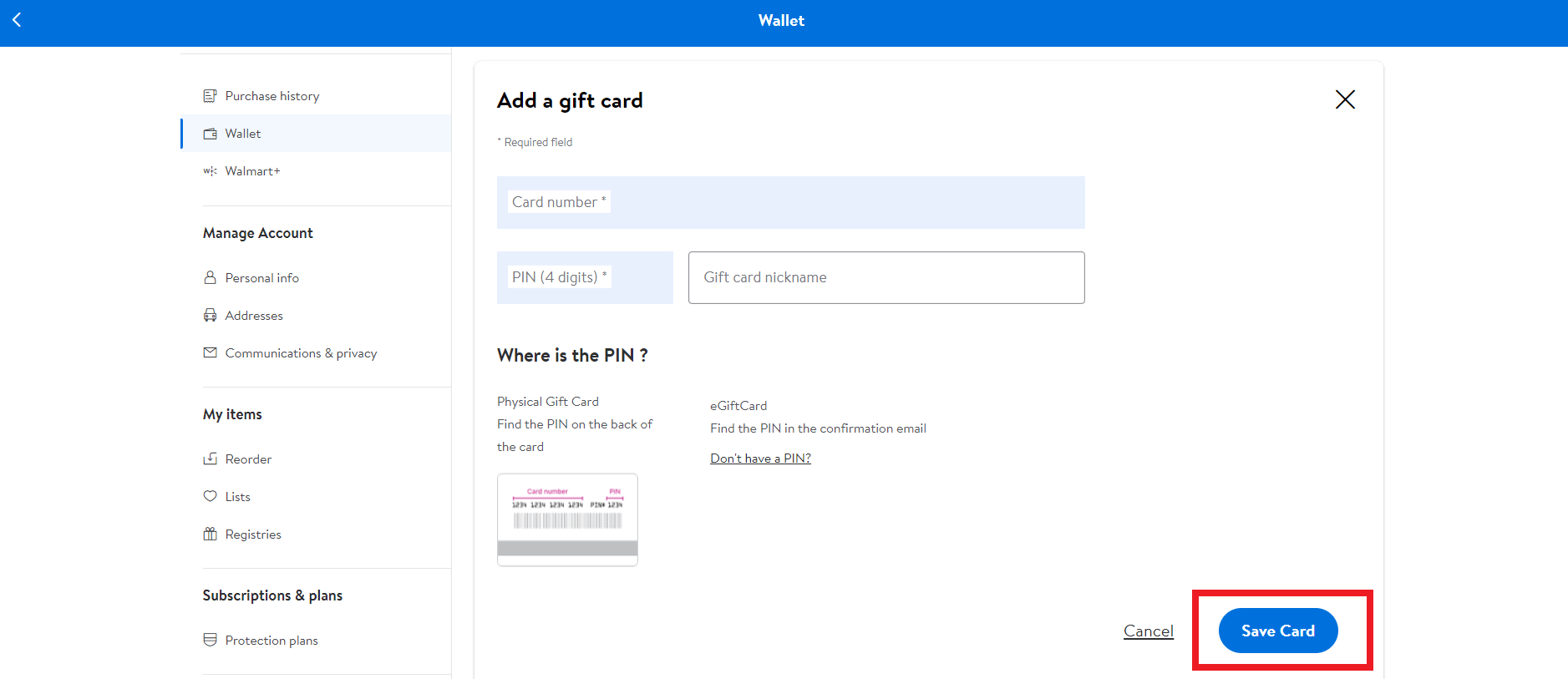
Step 3: Enter the 16-digit ID number and the four-digit PIN.
Step 4: Type in the name of the gift card and click on "Save Card".
Restriction
Any single transaction can have a reload amount of $100. The gift card balance can be as high as $1000
Alcohol, tobacco and firearms are not allowed to be purchased with this card
Terms & Policy
https://www.walmart.com/help/article/gift-card-terms-and-conditions/90f9e217278146898946c1d786bedea3
什么是 沃尔玛
使用沃尔玛电子礼品卡,您每天都可以在商店或 Walmart.com 网上以低价购买数以千计的热门产品。您会发现各式各样的顶级电子产品、玩具、家居必需品等。此外,卡片不会过期,您无需支付任何费用。
如何兑换
1. 前往您的沃尔玛账户
2. 单击“帐户”选项卡
3.转到付款方式并添加新的礼品卡
4.输入礼品卡信息并确认
限制
任何单笔交易都可以有 100 美元的充值金额。礼品卡余额可高达$1000
此卡不得购买烟酒和枪支
条款与政策
https://www.walmart.com/help/article/gift-card-terms-and-conditions/90f9e217278146898946c1d786bedea3
Question & Answer
1. I bought a key by mistake (wrong platform / region / version or multiple copies) and didn’t use it. Can I get refund ?
2. The CD-key that I purchased doesn’t work or stopped working. What should I do?
- My key is invalid: If you see an error message indicating that your key may be invalid, please check for the following: Are you activating the product on the proper platform? Have you copied the key properly?
- My key is region locked: If you see an error message suggesting that your key code can’t be activated in your region, please make sure to check first if you purchased your key for the correct region (by checking the product page on uquid.com). Some of the products sold on Uquid.com have regional restrictions and can be activated only in certain regions or countries.
-My key has already been used:
If the error message suggests that your key code has been used already:
Log out of your account and log back in, then check your library again. If you tried to enter your key multiple times, it may be that you activated it already but didn’t see the game in your library yet;
If the key you are trying to activate is for a DLC, it could be listed separately from the main game in your library. Make sure to check your library for DLCs or start the game to see if the code didn’t work already for you.
- My key has been revoked:
If you receive an information that your key code has been deactivated by the developer of the game, please contact us immediately and let us know of what happened with your key.
3. I tried to pay, but my payment/transaction is still pending?
Because of that, we recommend that you never close the checkout window in your browser or go back from a payment that is already being processed in Uquid checkout. Closing your browser window while your payment is still pending can cause issues with it and as a result interrupt delivery of your order – we wouldn’t want that to happen.
4. My payment is completed, but it’s now stuck on “Verification in progress…”?
5. My payment/transaction was refunded. When and how will I receive my funds back?
6. I didn’t receive my CD-key or any e-mail. What should I do?
Double check the e-mail address that you entered in the shopping cart during your purchase
Check the status of your order in the "Orders history"
Make sure to check if you haven't perhaps purchased a pre-order
If you have checked all of the above and still couldn't find an e-mail regarding your purchase, please contact our support team by creating a ticket here
Review
Related Products
