

Twitch Gift Card 100 GBP - twitch Key - UNITED KINGDOM
Buy twitch on UQUID using Bitcoin, Ethereum, USDT, USDC, Solana, TRON, Binance Pay, Gate Pay, Bybit Pay, Kucoin Pay and hundreds of other cryptocurrencies. UQUID provides instant digital delivery, secure crypto checkout, and easy worldwide redemption for gaming, shopping, entertainment, and mobile services...
Description
Twitch
What is Twitch
Twitch is where millions of people come together live every day to chat, interact, and make their own entertainment together. Twitch gift cards are the perfect gift for anyone who watches Twitch.
How to redeem
How To Redeem?
1. You must have a valid Twitch account to use this card.
2. To redeem: Visit https://www.twitch.tv/redeem
3. Enter the gift code
Twitch Gift Card Activation Guide
Step 1: Visit Twitch.tv and sign in to your account or create a new one if needed.
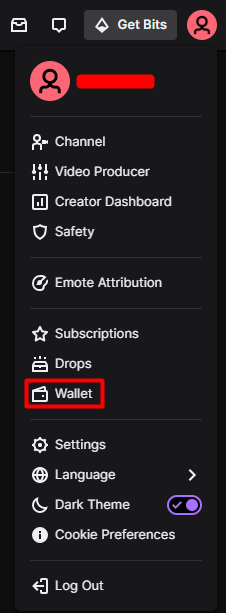
Step 2: Click on your profile picture in the upper-right corner of the page and select "Wallet".
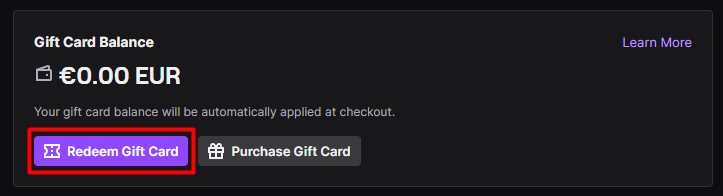
Step 3: In the "Gift Card Balance" section, select "Redeem Gift Card".
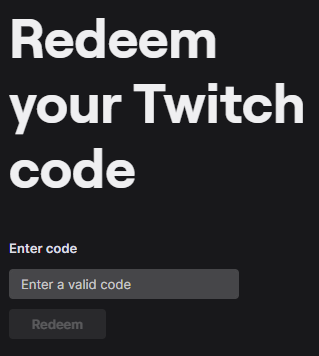
Step 4: Enter your Twitch gift card code then click on "Redeem".
Restriction
Gift card can only be redeemed for gift balance accounts that are denominated in country specified in product title . This card may be redeemed only on Twitch.tv, only by persons age 13 and up, and only for goods and services offered by Twitch or for goods sold on Twitch.tv or its applications.
Terms & Policy
https://help.twitch.tv/s/article/twitch-policies-and-guidelines?language=en_US
什么是 抽搐
Twitch 是數以百萬計的人每天聚集在一起聊天、互動和共同娛樂的地方。 Twitch 禮品卡是送給所有觀看 Twitch 的人的完美禮物。
如何兑换
1. 您必須擁有有效的 Twitch 帳戶才能使用此卡。
2. 兌換:訪問 https://www.twitch.tv/redeem
3.輸入禮包碼
限制
禮品卡只能兌換產品名稱中指定國家/地區計價的禮品餘額賬戶。此卡只能在 Twitch.tv 上兌換,僅限 13 歲及以上的人使用,並且只能用於 Twitch 提供的商品和服務或在 Twitch.tv 或其應用程序上出售的商品。
条款与政策
https://help.twitch.tv/s/article/twitch-policies-and-guidelines?language=en_US
Question & Answer
1. I bought a key by mistake (wrong platform / region / version or multiple copies) and didn’t use it. Can I get refund ?
2. The CD-key that I purchased doesn’t work or stopped working. What should I do?
- My key is invalid: If you see an error message indicating that your key may be invalid, please check for the following: Are you activating the product on the proper platform? Have you copied the key properly?
- My key is region locked: If you see an error message suggesting that your key code can’t be activated in your region, please make sure to check first if you purchased your key for the correct region (by checking the product page on uquid.com). Some of the products sold on Uquid.com have regional restrictions and can be activated only in certain regions or countries.
-My key has already been used:
If the error message suggests that your key code has been used already:
Log out of your account and log back in, then check your library again. If you tried to enter your key multiple times, it may be that you activated it already but didn’t see the game in your library yet;
If the key you are trying to activate is for a DLC, it could be listed separately from the main game in your library. Make sure to check your library for DLCs or start the game to see if the code didn’t work already for you.
- My key has been revoked:
If you receive an information that your key code has been deactivated by the developer of the game, please contact us immediately and let us know of what happened with your key.
3. I tried to pay, but my payment/transaction is still pending?
Because of that, we recommend that you never close the checkout window in your browser or go back from a payment that is already being processed in Uquid checkout. Closing your browser window while your payment is still pending can cause issues with it and as a result interrupt delivery of your order – we wouldn’t want that to happen.
4. My payment is completed, but it’s now stuck on “Verification in progress…”?
5. My payment/transaction was refunded. When and how will I receive my funds back?
6. I didn’t receive my CD-key or any e-mail. What should I do?
Double check the e-mail address that you entered in the shopping cart during your purchase
Check the status of your order in the "Orders history"
Make sure to check if you haven't perhaps purchased a pre-order
If you have checked all of the above and still couldn't find an e-mail regarding your purchase, please contact our support team by creating a ticket here
Review
Related Products
