

H&M Gift Card 100 EUR - GERMANY
Buy H&M on UQUID using Bitcoin, Ethereum, USDT, USDC, Solana, TRON, Binance Pay, Gate Pay, Bybit Pay, Kucoin Pay and hundreds of other cryptocurrencies. UQUID provides instant digital delivery, secure crypto checkout, and easy worldwide redemption for gaming, shopping, entertainment, and mobile services...
Description
H&M
What is H&M
H&M offers a wide range of great quality fashion at the best price in a sustainable way for women, men and children. H&M's range includes everything from wardrobe basics, trend-led fashion, party collections and sportswear. The fashion offering reflects the latest in international trends to updated fashion classics. Shop in-store and online now!
How to redeem
Shop Online:
1. Select 'Add gift card' in the checkout process.
2. Enter the gift card number and PIN code in the pop-up screen.
3. Make sure to click “add” to apply the gift card towards your purchase.
Shop in Stores:
1. Display the gift card number and associated PIN on your mobile device or print it.
2. Present this information to the sales advisor at checkout to type in.
H&M Gift Card Activation
Step 1: At checkout, under the payment section, select "Add Gift Cards";
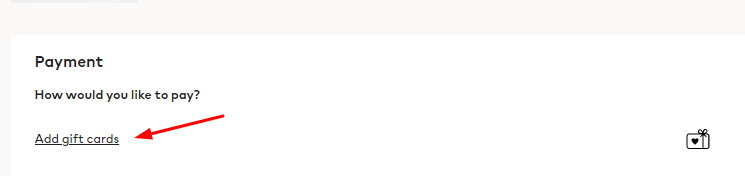
Step 2: In the pop-up window, enter the PIN of your H&M voucher and click "Save".

Restriction
Gift Cards are available in selected markets: https://www.hm.com/vn/customer-service/gift-cards/gift-cards/
Terms & Policy
https://www2.hm.com/en_us/customer-service/gift-card/terms---conditions.html
H&M
什么是 H&M
H&M 以可持續的方式以最優惠的價格為女士、男士和兒童提供各種優質時裝。 H&M 的產品系列包括衣櫥基本款、引領潮流的時裝、派對系列和運動裝。時尚產品反映了最新的國際趨勢和更新的時尚經典。立即在店內和網上購物!
如何兑换
網上購物:
1. 在結賬時選擇付款下的“添加禮品卡”。
2. 在彈出的畫面中輸入禮品卡號和PIN碼。
3. 請務必點擊“添加”以將禮品卡用於您的購買。
在商店購物:
1. 在您的移動設備上顯示禮品卡號和關聯的 PIN 碼或打印出來。
2. 在結賬時向銷售顧問出示此信息以輸入。
限制
禮品卡在特定市場有售:https://www.hm.com/vn/customer-service/gift-cards/gift-cards/
条款与政策
https://www2.hm.com/en_us/customer-service/gift-card/terms---conditions.html
Question & Answer
1. I bought a key by mistake (wrong platform / region / version or multiple copies) and didn’t use it. Can I get refund ?
2. The CD-key that I purchased doesn’t work or stopped working. What should I do?
- My key is invalid: If you see an error message indicating that your key may be invalid, please check for the following: Are you activating the product on the proper platform? Have you copied the key properly?
- My key is region locked: If you see an error message suggesting that your key code can’t be activated in your region, please make sure to check first if you purchased your key for the correct region (by checking the product page on uquid.com). Some of the products sold on Uquid.com have regional restrictions and can be activated only in certain regions or countries.
-My key has already been used:
If the error message suggests that your key code has been used already:
Log out of your account and log back in, then check your library again. If you tried to enter your key multiple times, it may be that you activated it already but didn’t see the game in your library yet;
If the key you are trying to activate is for a DLC, it could be listed separately from the main game in your library. Make sure to check your library for DLCs or start the game to see if the code didn’t work already for you.
- My key has been revoked:
If you receive an information that your key code has been deactivated by the developer of the game, please contact us immediately and let us know of what happened with your key.
3. I tried to pay, but my payment/transaction is still pending?
Because of that, we recommend that you never close the checkout window in your browser or go back from a payment that is already being processed in Uquid checkout. Closing your browser window while your payment is still pending can cause issues with it and as a result interrupt delivery of your order – we wouldn’t want that to happen.
4. My payment is completed, but it’s now stuck on “Verification in progress…”?
5. My payment/transaction was refunded. When and how will I receive my funds back?
6. I didn’t receive my CD-key or any e-mail. What should I do?
Double check the e-mail address that you entered in the shopping cart during your purchase
Check the status of your order in the "Orders history"
Make sure to check if you haven't perhaps purchased a pre-order
If you have checked all of the above and still couldn't find an e-mail regarding your purchase, please contact our support team by creating a ticket here
Review
Related Products
