

DoorDash Gift Card 150 AUD - Door Dash Key - AUSTRALIA
Buy Door Dash on UQUID using Bitcoin, Ethereum, USDT, USDC, Solana, TRON, Binance Pay, Gate Pay, Bybit Pay, Kucoin Pay and hundreds of other cryptocurrencies. UQUID provides instant digital delivery, secure crypto checkout, and easy worldwide redemption for gaming, shopping, entertainment, and mobile services...
Description
DoorDash
What is DoorDash
The DoorDash app connects your favorite people with the best of their neighborhood, including restaurants, convenience stores, grocery stores, pet supplies and more. Choose from more than 310,000 local and national restaurants and stores across 4,000 cities in the US & Canada. Giving the gift of delivery allows your loved ones to have easier evenings, happier days, and more time to enjoy the people and things they love.
How to redeem
How To Redeem?
1. Click on the menu icon (3 stacked lines) in the top left corner.
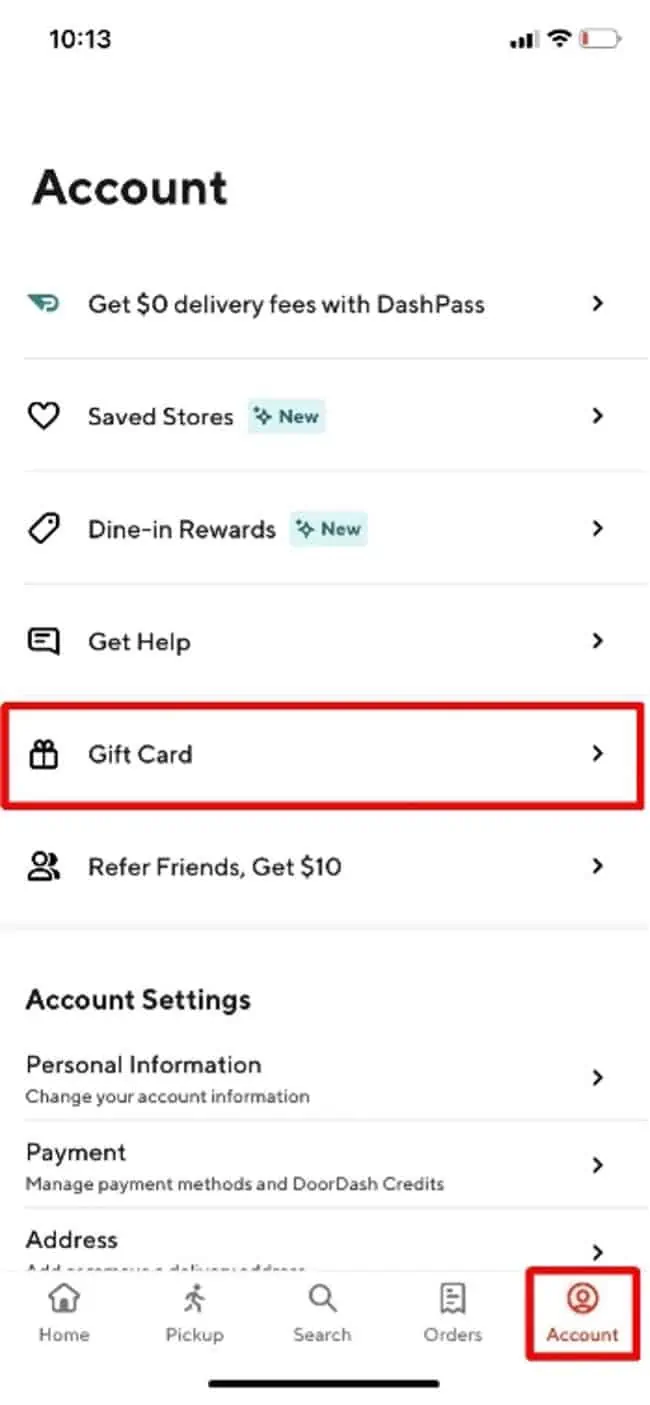
2. Click on "Gift Card"
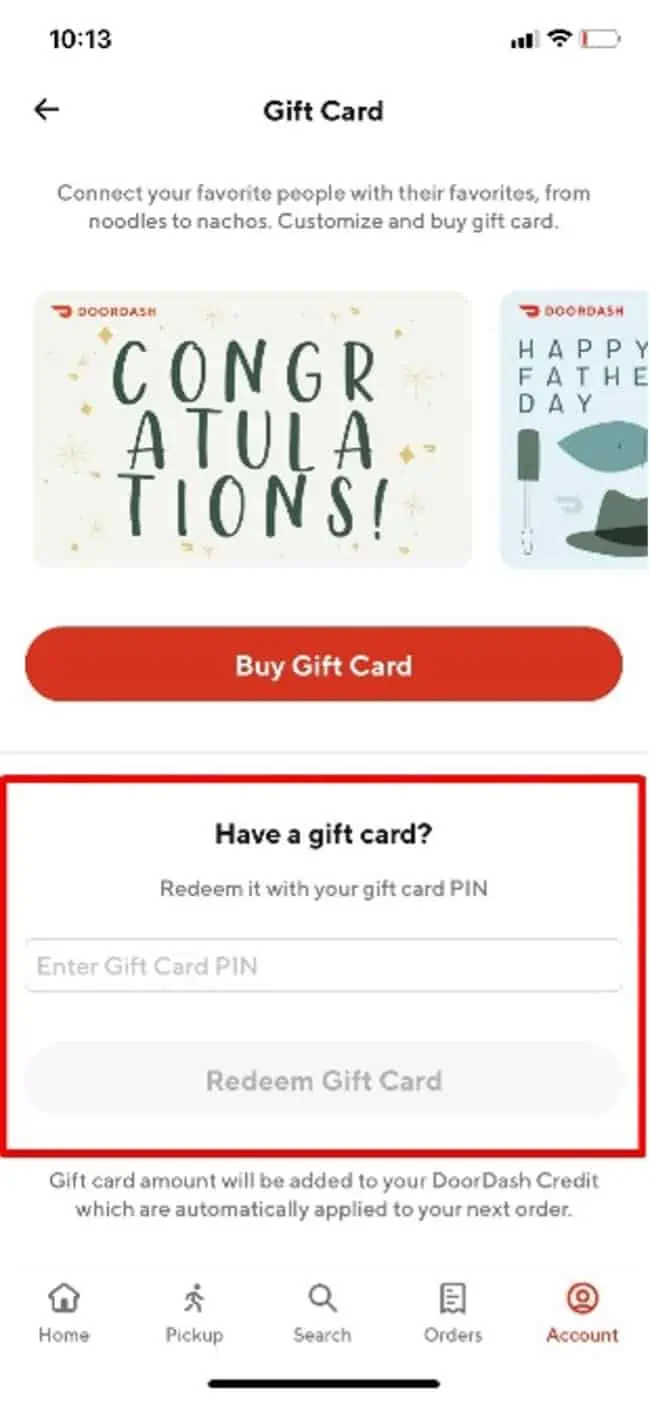
3. Enter the "Gift Card Pin"
4. Click "Redeem Gift Card"
5. Confirmation: The Gift Card amount will appear and the DoorDash credit will automatically apply to your next order.
DoorDash Gift Card Activation Guide
Step 1: Create an account or log in to the DoorDash app.
Step 2: Go to "Account" → "Gift Card".
Step 3: Enter the PIN of your gift card and click "Redeem Gift Card".
Restriction
You must be at least 18 years old, have an iPhone or Android smartphone, and complete the sign-up process. Q: What are the phone requirements to dash? A: Dashers can use their iOS or Android phones. Certain jailbroken or rooted phones may have trouble accessing the Dasher app
Terms & Policy
doordash.com
什么是 门冲
DoorDash 应用程序将您最喜欢的人与他们附近最好的地方联系起来,包括餐馆、便利店、杂货店、宠物用品等。从美国和加拿大 4,000 个城市的 310,000 多家本地和全国餐厅和商店中进行选择。送出分娩礼物可以让您所爱的人度过更轻松的夜晚、更快乐的日子,以及有更多时间享受他们所爱的人和事。
如何兑换
1. 单击左上角的菜单图标(3 条堆叠线)。
2. 点击“礼品卡”
3. 输入“礼品卡密码”
4. 点击“兑换礼品卡”
5. 确认:将显示礼品卡金额,DoorDash 积分将自动应用于您的下一个订单
限制
您必须年满 18 岁,拥有 iPhone 或 Android 智能手机,并完成注册过程。问:dash 对手机有什么要求?答:Dashers 可以使用他们的 iOS 或 Android 手机。某些越狱或获得 root 权限的手机可能无法访问 Dasher 应用程序
条款与政策
doordash.com
Question & Answer
1. I bought a key by mistake (wrong platform / region / version or multiple copies) and didn’t use it. Can I get refund ?
2. The CD-key that I purchased doesn’t work or stopped working. What should I do?
- My key is invalid: If you see an error message indicating that your key may be invalid, please check for the following: Are you activating the product on the proper platform? Have you copied the key properly?
- My key is region locked: If you see an error message suggesting that your key code can’t be activated in your region, please make sure to check first if you purchased your key for the correct region (by checking the product page on uquid.com). Some of the products sold on Uquid.com have regional restrictions and can be activated only in certain regions or countries.
-My key has already been used:
If the error message suggests that your key code has been used already:
Log out of your account and log back in, then check your library again. If you tried to enter your key multiple times, it may be that you activated it already but didn’t see the game in your library yet;
If the key you are trying to activate is for a DLC, it could be listed separately from the main game in your library. Make sure to check your library for DLCs or start the game to see if the code didn’t work already for you.
- My key has been revoked:
If you receive an information that your key code has been deactivated by the developer of the game, please contact us immediately and let us know of what happened with your key.
3. I tried to pay, but my payment/transaction is still pending?
Because of that, we recommend that you never close the checkout window in your browser or go back from a payment that is already being processed in Uquid checkout. Closing your browser window while your payment is still pending can cause issues with it and as a result interrupt delivery of your order – we wouldn’t want that to happen.
4. My payment is completed, but it’s now stuck on “Verification in progress…”?
5. My payment/transaction was refunded. When and how will I receive my funds back?
6. I didn’t receive my CD-key or any e-mail. What should I do?
Double check the e-mail address that you entered in the shopping cart during your purchase
Check the status of your order in the "Orders history"
Make sure to check if you haven't perhaps purchased a pre-order
If you have checked all of the above and still couldn't find an e-mail regarding your purchase, please contact our support team by creating a ticket here
Review
Related Products
