

Apple iTunes Gift Card 150 AED iTunes UNITED ARAB EMIRATES
Buy iTunes on UQUID using Bitcoin, Ethereum, USDT, USDC, Solana, TRON, Binance Pay, Gate Pay, Bybit Pay, Kucoin Pay and hundreds of other cryptocurrencies. UQUID provides instant digital delivery, secure crypto checkout, and easy worldwide redemption for gaming, shopping, entertainment, and mobile services...
Description
iTunes Gift Card
What is iTunes Gift Card
Apple iTunes Gift Card provides all the excitement of discovering the contents of the iTunes Store. With this card, you can gift someone with access to applications, music, movies and games. And the best thing about it is that you won’t disappoint them, because they’ll be able to choose what to buy for themselves.
You can use the card as a gift for a friend, family member, significant other or even for yourself, and enter the world of music. With its approachable prices, iTunes Store offers newest hits and timeless classics. Buy songs separately or as complete albums and listen to them anytime you want. You can even create your own playlist of favorite tracks.
If you think that music is all you can buy with the card, you should think again. Apple iTunes Gift Card provides the access to movies and TV shows in high resolution, newest and trendiest apps and games, as well as e-books to read while relaxing at home or on the way from work.
How to redeem
Redeem a gift card with your iPhone, iPad, or iPod Touch
1. Find the 16-digit code on the back of the card. For some gift cards, you might need to peel or gently scratch off the label to see the code.
2. On your iPhone, iPad, or iPod touch, open the App Store app.
3. At the top of the screen, tap the sign-in button or your photo.
4. Tap Redeem Gift Card or Code. If you don’t see Redeem Gift Card or Code, sign in with your Apple ID.
5. Tap Use Camera and follow the instructions on the screen. If you
have trouble redeeming the card, tap Enter Code Manually, then follow
the instructions on the screen.
6. Tap Done.
Redeem a gift card on your Mac
- 1. Find the 16-digit code on the back of the card. For some gift cards, you might need to peel or gently scratch off the label to see the code.
- 2. On your Mac, open the App Store.
- 3. Click your name or the sign-in button in the sidebar.
- 4. Click Redeem Gift Card.
Redeem a gift card on your Windows PC
- 1. Find the 16-digit code on the back of the card. For some gift cards, you might need to peel or gently scratch off the label to see the code.
- 2. Open iTunes.
- 3. From the menu bar at the top of the iTunes window, choose Account.
- 4. Choose Redeem.
- 5. Sign in and follow the instructions on the screen.
Redeem a gift card on your Android
- 1. Find the 16-digit code on the back of the card. For some gift cards, you might need to peel or gently scratch off the label to see the code.
- 2. Open the Apple Music app.
- 3. Tap the menu button, then tap Account.
- 4. Tap Redeem Gift Card or Code.
- 5. Enter the 16-digit code. Then tap Redeem.
iTunes Gift Card Activation
To activate an iTunes Gift Card that you purchased at Uquid, you will need to have your iTunes app (If you don't have an account, it can be created on this link here) and follow these steps:
Step 1: Launch the iTunes application and log in to your account.
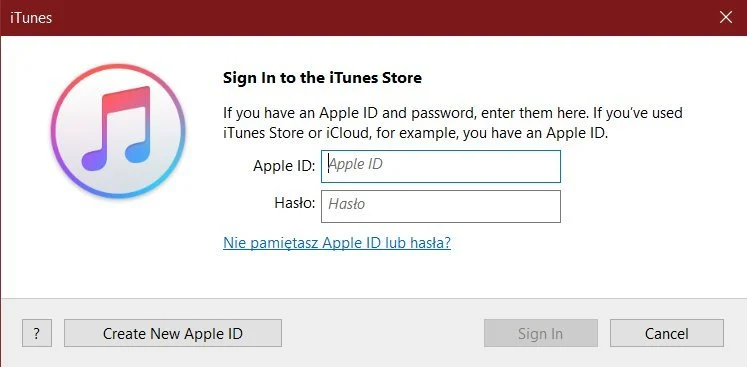
Step 2: From the menu bar at the top of the iTunes window, choose “Account”, then choose “Redeem”.

Step 3: Enter the code you have received from Uquid and click on the “Redeem” button.

Step 4: The funds have been added to your iTunes account. You can use the balance now!
Restriction
Different country's iTunes Gift Card code
iTunes Gift Cards are country-specific. If you're trying to redeem a gift card that was purchased in a different country, make sure that you're redeeming it in the same country's iTunes Store.
You can't redeem gift cards outside of the country of purchase. For example, a gift card purchased in China can't be redeemed in an iTunes Store in Japan.
Terms & Policy
iTunes Gift Card Payment SCAM ALERT
DO NOT TRADE iTunes Gift Card as payment for your online purchases or game items!
We were alerted by some customers regarding such SCAM. Kindly note that we
are NOT associated with any scam websites/forums/person.
Itunes
什么是 Itunes
Apple iTunes 礼品卡提供发现 iTunes Store 内容的所有乐趣。 有了这张卡,您就可以将访问应用程序、音乐、电影和游戏的权限赠送给某人。 最好的一点是您不会让他们失望,因为他们将能够为自己选择购买什么。
您可以将此卡用作送给朋友、家人、重要的其他人甚至自己的礼物,并进入音乐的世界。 凭借其平易近人的价格,iTunes Store 提供最新的热门歌曲和永恒的经典。 单独购买歌曲或作为完整专辑购买,并随时聆听。 您甚至可以创建自己喜欢的曲目的播放列表
如果您认为音乐是您可以用卡购买的全部内容,那么您应该再想一想。 Apple iTunes 礼品卡提供高分辨率的电影和电视节目、最新和最流行的应用程序和游戏,以及电子书,供您在家中放松或下班途中阅读。
如何兑换
可通过电子邮件发送的兑换代码。
限制
购买前仔细检查您的位置。
Question & Answer
1. I bought a key by mistake (wrong platform / region / version or multiple copies) and didn’t use it. Can I get refund ?
2. The CD-key that I purchased doesn’t work or stopped working. What should I do?
- My key is invalid: If you see an error message indicating that your key may be invalid, please check for the following: Are you activating the product on the proper platform? Have you copied the key properly?
- My key is region locked: If you see an error message suggesting that your key code can’t be activated in your region, please make sure to check first if you purchased your key for the correct region (by checking the product page on uquid.com). Some of the products sold on Uquid.com have regional restrictions and can be activated only in certain regions or countries.
-My key has already been used:
If the error message suggests that your key code has been used already:
Log out of your account and log back in, then check your library again. If you tried to enter your key multiple times, it may be that you activated it already but didn’t see the game in your library yet;
If the key you are trying to activate is for a DLC, it could be listed separately from the main game in your library. Make sure to check your library for DLCs or start the game to see if the code didn’t work already for you.
- My key has been revoked:
If you receive an information that your key code has been deactivated by the developer of the game, please contact us immediately and let us know of what happened with your key.
3. I tried to pay, but my payment/transaction is still pending?
Because of that, we recommend that you never close the checkout window in your browser or go back from a payment that is already being processed in Uquid checkout. Closing your browser window while your payment is still pending can cause issues with it and as a result interrupt delivery of your order – we wouldn’t want that to happen.
4. My payment is completed, but it’s now stuck on “Verification in progress…”?
5. My payment/transaction was refunded. When and how will I receive my funds back?
6. I didn’t receive my CD-key or any e-mail. What should I do?
Double check the e-mail address that you entered in the shopping cart during your purchase
Check the status of your order in the "Orders history"
Make sure to check if you haven't perhaps purchased a pre-order
If you have checked all of the above and still couldn't find an e-mail regarding your purchase, please contact our support team by creating a ticket here
Review
Related Products
