

Amazon Pay E-Gift Card 20 INR Gift Card India
Buy Amazon on UQUID using Bitcoin, Ethereum, USDT, USDC, Solana, TRON, Binance Pay, Gate Pay, Bybit Pay, Kucoin Pay and hundreds of other cryptocurrencies. UQUID provides instant digital delivery, secure crypto checkout, and easy worldwide redemption for gaming, shopping, entertainment, and mobile services...
Description
- Amazon Pay Gift Card – The Perfect Gift for Every Celebration!
- Gift your loved ones Amazon Pay E-Gift Cards for various celebratory occasions in life and let them experience instant shopping gratification
Redemption Instructions
To add your GC to your Amazon Pay balance using a browser:Visit www.amazon.in/addgiftcard & login with your Amazon account credentials.
Apply the 14 digit code in the 'Add gift card to balance' field and proceed to redeem.
The Amazon Pay balance will be topped up.
Customer can add multiple Gift Cards to an account
How to redeem (using Mobile App)
Open the app and sign in using your login credentials.
Go to 'Menu' and select the 'Amazon Pay' tile at the top-left corner.
Select the 'Gift cards' option.
Select 'Add a Gift card' option.
Enter the Amazon Shopping voucher code in 'Enter gift card'/'Gift card code' field
Select 'Add gift card to balance'.
The Amazon Pay balance will be topped up. Customer can add multiple Gift Cards to an account
Terms of use
- Redemption: Gift Cards may only be redeemed toward the purchase of eligible products on Amazon.in and any other third party merchants that are enabled to accept the Gift Cards. Purchases are deducted from the redeemer's Gift Card balance. Any unused Gift Card balance will remain associated with the redeemers' Amazon Pay balance account and applied to purchases in order of earliest expiration date. If a purchase exceeds the redeemers' Gift Card balance, the remaining amount must be paid with by credit card, net banking or debit card. No fees or charges apply to Gift Cards. Vananam may provide Gift Card purchasers with information about the redemption status of Gift Cards that they purchase or use. Certain merchants may provide you services only on the pre-condition that you allow to hold your balances in your Amazon Pay balance: Gift Card till the service completion by the merchant. However, your prior consent would be taken before holding such balances. In such cases, you agree and authorize to: (i) hold your balance until service completion; and (ii) fail the transaction if your balance in the Amazon Pay Gift Card is less than the actual amount charged by the merchant for the services.
- Limitations: Gift Cards, including any unused Gift Card balances, expire one year from the date of issuance. You may request for revalidation of any expired Gift Cards. Upon receipt of such request, the Gift Card may be revalidated after due verification and subject to additional applicable terms and conditions. Gift Cards may only be purchased in denominations ranging from Rs. 10 to Rs. 10,000, or such other limits as Vananam may determine. Gift Cards cannot be used to purchase other gift cards. Gift Cards cannot be reloaded, resold, transferred for value or redeemed for cash. Except as provided hereunder or as per applicable law, amount in your Gift Cards will not be refunded to you under any circumstances. No refund will be provided in cash, at any point of time. Unused Gift Card balances may not be transferred to another users account. No interest will be payable by Vananam on any Gift Card or Gift Card balance. Vananam make no representation or warranty that Amazon.in will always be accessible without interruption.
- Fraud: Vananam is not responsible if a Gift Card is lost, stolen, destroyed or used without permission. Amazon Seller Services Private Limited (together with Amazon Pay is referred to as 'Amazon') will have the right to close customer accounts and take payment from alternative forms of payment if a fraudulently obtained Gift Card is redeemed and/or used to make purchases on Amazon.in.
- Governing Law and Jurisdiction: These terms and conditions are governed by and construed in accordance with the laws of India. You, Vananam and Amazon each agree to submit to the exclusive jurisdiction of the courts at Bangalore. You agree to indemnify Vananam and Amazon from all claims brought by a third party against it or its affiliates arising out of or in connection with a breach of any of these terms and conditions.
- Limitation of Liability: NEITHER VANANAM NOR AMAZON MAKE ANY WARRANTIES, EXPRESS OR IMPLIED, WITH RESPECT TO GIFT CARDS, INCLUDING WITHOUT LIMITATION, ANY EXPRESS OR IMPLIED WARRANTY OF MERCHANTABILITY OR FITNESS FOR A PARTICULAR PURPOSE. IN THE EVENT A GIFT CARD IS NON-FUNCTIONAL, YOUR SOLE REMEDY WILL BE THE REPLACEMENT OF SUCH GIFT CARD. IF APPLICABLE LAW DOES NOT ALLOW LIMITATIONS ON IMPLIED WARRANTIES OR THE EXCLUSION OR LIMITATION OF CERTAIN DAMAGES, SOME OR ALL OF THE ABOVE DISCLAIMERS, EXCLUSIONS, OR LIMITATIONS MAY NOT APPLY TO YOU, AND YOU MAY HAVE ADDITIONAL RIGHTS.
- Password Security: You shall, at all times, keep the passwords that are by you or your customers/beneficiaries on Amazon.in strictly confidential and not reveal the same to any person or entity.
- General Terms: The Amazon.in Conditions of Use apply to Gift Cards. Vananam and/or Amazon reserves the right to change these Gift Card terms and conditions from time to time in its discretion and without prior notice to you. All terms and conditions are applicable to the extent permitted by law.
- You are not permitted to use any of the Amazon trademarks, logos and related taglines except in accordance with the brand use requirements as set forth in the brand use resource center found at http://www.amazon.in/CorporateGiftCardBrandUseGuidelines, as modified by Amazon from time to time in its sole discretion.
- The approved brand use guidelines can be found at https://www.amazon.in/l/17543658031.You agree to make good the losses suffered by Vananam in the event Amazon imposes any penalty due to your breach of any terms set out herein.
- E-Gift Cards are normally delivered instantly. But sometimes due to system issues, the delivery can be delayed upto 24 - 48 hours.
- No returns and no refunds on gift cards, e-gift cards and gift vouchers shipped by Vananam
Amazon
What is Amazon
Amazon Gift Card is a simple and 100% safe way of shopping online. On Amazon.com you will find thousands of items from all categories. Video games, electronics, furniture, food, and more! Amazon has it all. While shopping online using Amazon Gift Card, you can be sure that your money is safe. The voucher does not require any personal information or credit card number.
How to redeem
How To Redeem?
1. Access to your Amazon account
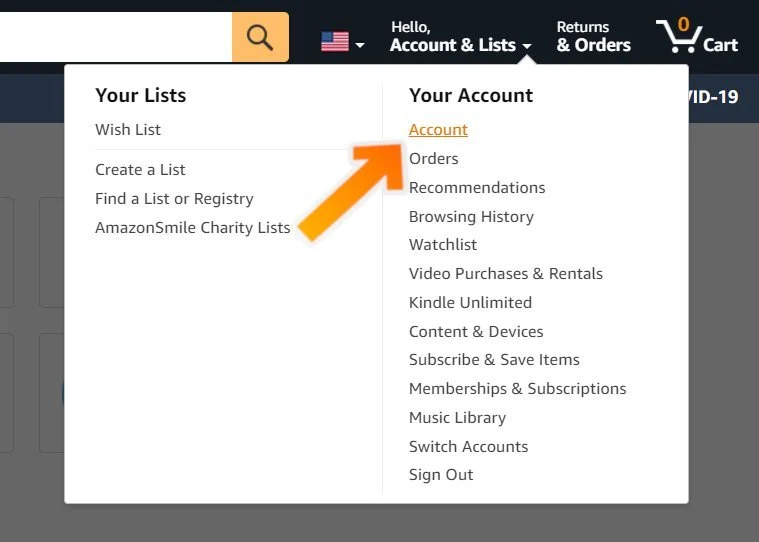
2. Choose the “Account & Lists” menu. This will display a submenu.
3. From the submenu, select “Account.”
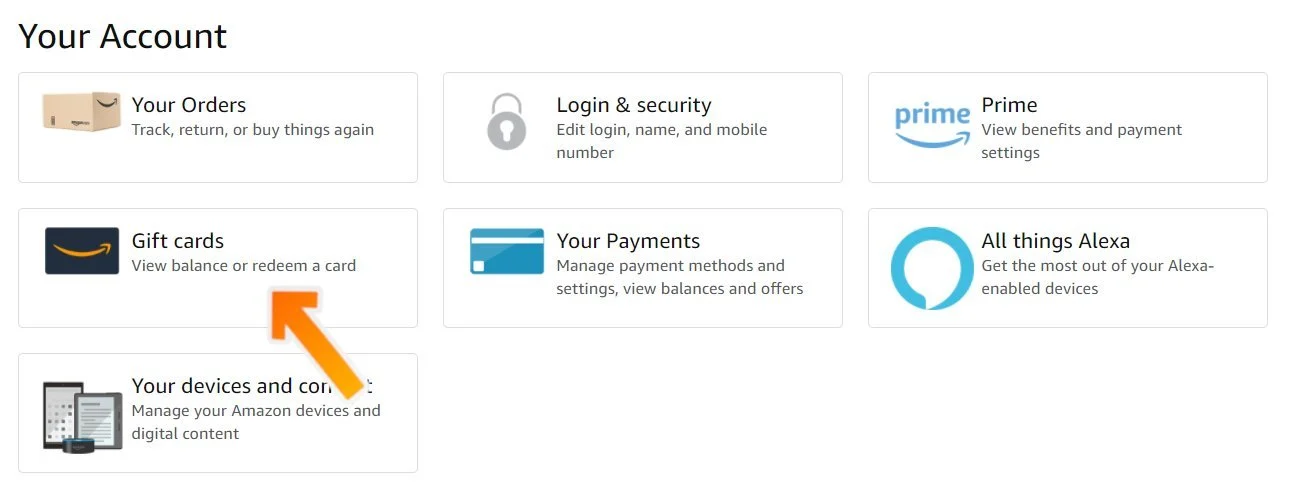
4. Click “Gift Cards.” -> the “Redeem a Gift Card” button.
5. Enter your claim code and select Apply to Your Balance.
Amazon Gift Card Activation Guide
Step 1: Launch the Amazon site and log in to your account.
Step 2: Select "Account & Lists" from the menu bar at the top of the Amazon window, then choose "Account".
Step 3: Click on the “Gift cards” button, then choose “Redeem a Gift Card”.

Step 4: Enter the code you have received from Uquid and click on the button “Apply to your balance”.

Step 5: The funds have been added to your Amazon account. You can use the balance now!
Restriction
1. Transfer a gift card to another account once the claim code has been redeemed.
2. Redeem a gift card to an account if you are not the intended recipient. An example of when you are the intended recipient is if you received the gift card as a gift. You are not the intended recipient if you fraudulently deceived the purchaser into giving or selling you a gift card (even if they willingly do so at the time of transfer).
什么是 亚马逊
亚马逊礼品卡是一种简单且 100% 安全的在线购物方式。 在 Amazon.com 上,您可以找到所有类别的数千种商品。 视频游戏、电子产品、家具、食品等等! 亚马逊拥有一切。 使用亚马逊礼品卡在线购物时,您可以确保您的资金安全。 该优惠券不需要任何个人信息或信用卡号码。如何兑换
限制
1. 兑换索赔代码后,将礼品卡转移到另一个帐户。
2. 如果您不是预期的接收者,请将礼品卡兑换到帐户。 例如,如果您收到礼品卡作为礼物,则说明您是预期接收者。 如果您以欺诈手段欺骗购买者向您赠送或出售礼品卡(即使他们在转让时愿意这样做),那么您就不是预期的接收者。
Question & Answer
1. I bought a key by mistake (wrong platform / region / version or multiple copies) and didn’t use it. Can I get refund ?
2. The CD-key that I purchased doesn’t work or stopped working. What should I do?
- My key is invalid: If you see an error message indicating that your key may be invalid, please check for the following: Are you activating the product on the proper platform? Have you copied the key properly?
- My key is region locked: If you see an error message suggesting that your key code can’t be activated in your region, please make sure to check first if you purchased your key for the correct region (by checking the product page on uquid.com). Some of the products sold on Uquid.com have regional restrictions and can be activated only in certain regions or countries.
-My key has already been used:
If the error message suggests that your key code has been used already:
Log out of your account and log back in, then check your library again. If you tried to enter your key multiple times, it may be that you activated it already but didn’t see the game in your library yet;
If the key you are trying to activate is for a DLC, it could be listed separately from the main game in your library. Make sure to check your library for DLCs or start the game to see if the code didn’t work already for you.
- My key has been revoked:
If you receive an information that your key code has been deactivated by the developer of the game, please contact us immediately and let us know of what happened with your key.
3. I tried to pay, but my payment/transaction is still pending?
Because of that, we recommend that you never close the checkout window in your browser or go back from a payment that is already being processed in Uquid checkout. Closing your browser window while your payment is still pending can cause issues with it and as a result interrupt delivery of your order – we wouldn’t want that to happen.
4. My payment is completed, but it’s now stuck on “Verification in progress…”?
5. My payment/transaction was refunded. When and how will I receive my funds back?
6. I didn’t receive my CD-key or any e-mail. What should I do?
Double check the e-mail address that you entered in the shopping cart during your purchase
Check the status of your order in the "Orders history"
Make sure to check if you haven't perhaps purchased a pre-order
If you have checked all of the above and still couldn't find an e-mail regarding your purchase, please contact our support team by creating a ticket here
Review
Related Products
