


DoorDash 20 AUD Australia Gift Card
Buy DoorDash on UQUID using Bitcoin, Ethereum, USDT, USDC, Solana, TRON, Binance Pay, Gate Pay, Bybit Pay, Kucoin Pay and hundreds of other cryptocurrencies. UQUID provides instant digital delivery, secure crypto checkout, and easy worldwide redemption for gaming, shopping, entertainment, and mobile services...
Options:
Description
Give the gift of food delivery with a DoorDash gift card. The DoorDash app connects your favourite people with the foods they love. Gift food delivery for easier evenings, happier days, and more time to enjoy the people and things they love. Available in Melbourne, Sydney, Geelong and Brisbane.
Please note: gift card is eligible to be used in the country matching the currency of the gift card.
Terms and Conditions
Your Gift Card is redeemable towards eligible orders placed on www.doordash.com or in the DoorDash App in Australia. Gift Cards are made available and provided by DoorDash Technologies Australia Pty Ltd. Gift Cards cannot be used to pay a credit account and are not redeemable for cash except when required by applicable law. Purchases with Gift Card are subject to DoorDash standard refund policy, and any refund amounts will be credited back to the DoorDash consumer account. Gift Cards will not expire. For more information on the Gift Card Terms and Conditions, please visit help.doordash.com/consumers/s/article/doordash-gift-cards and also https://help.doordash.com/consumers/s/article/DoorDash-Gift-Cards-Terms-and-Conditions-Australia
DoorDash
What is DoorDash
The DoorDash app connects your favorite people with the best of their neighborhood, including restaurants, convenience stores, grocery stores, pet supplies and more. Choose from more than 310,000 local and national restaurants and stores across 4,000 cities in the US & Canada. Giving the gift of delivery allows your loved ones to have easier evenings, happier days, and more time to enjoy the people and things they love.
How to redeem
How To Redeem?
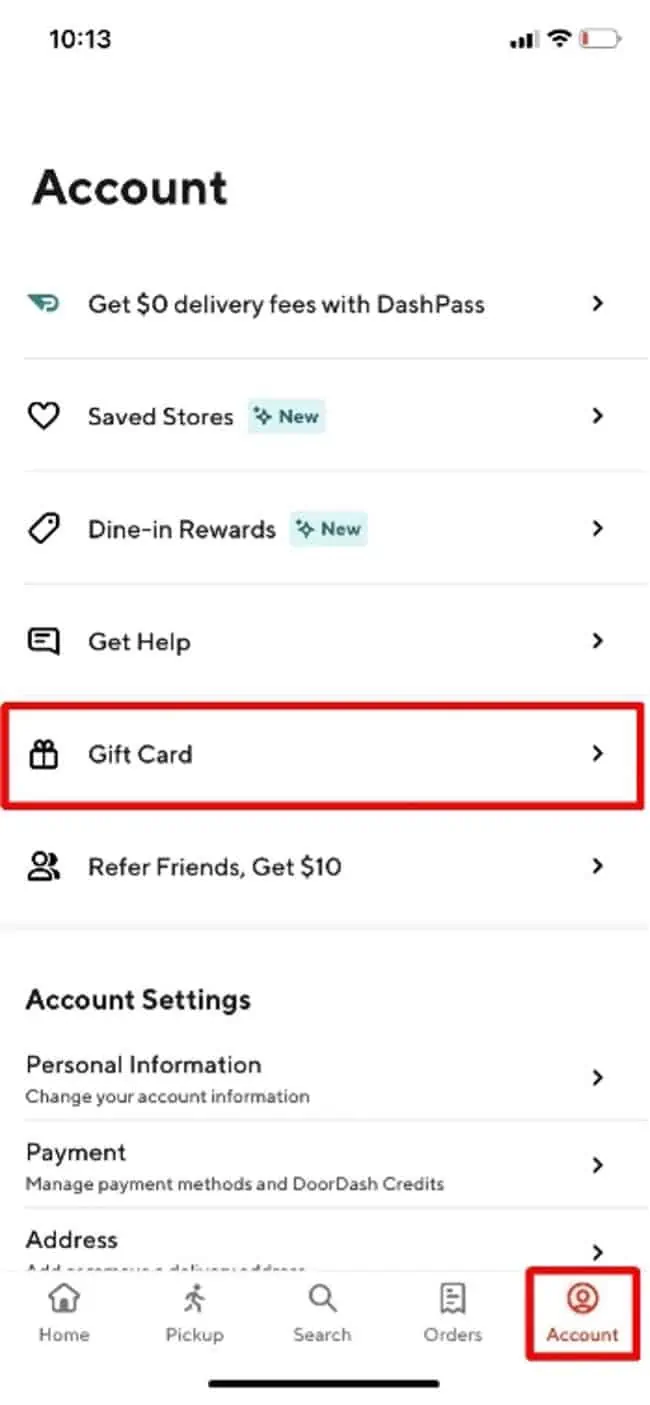
1. Click on the menu icon (3 stacked lines) in the top left corner.
2. Click on "Gift Card"
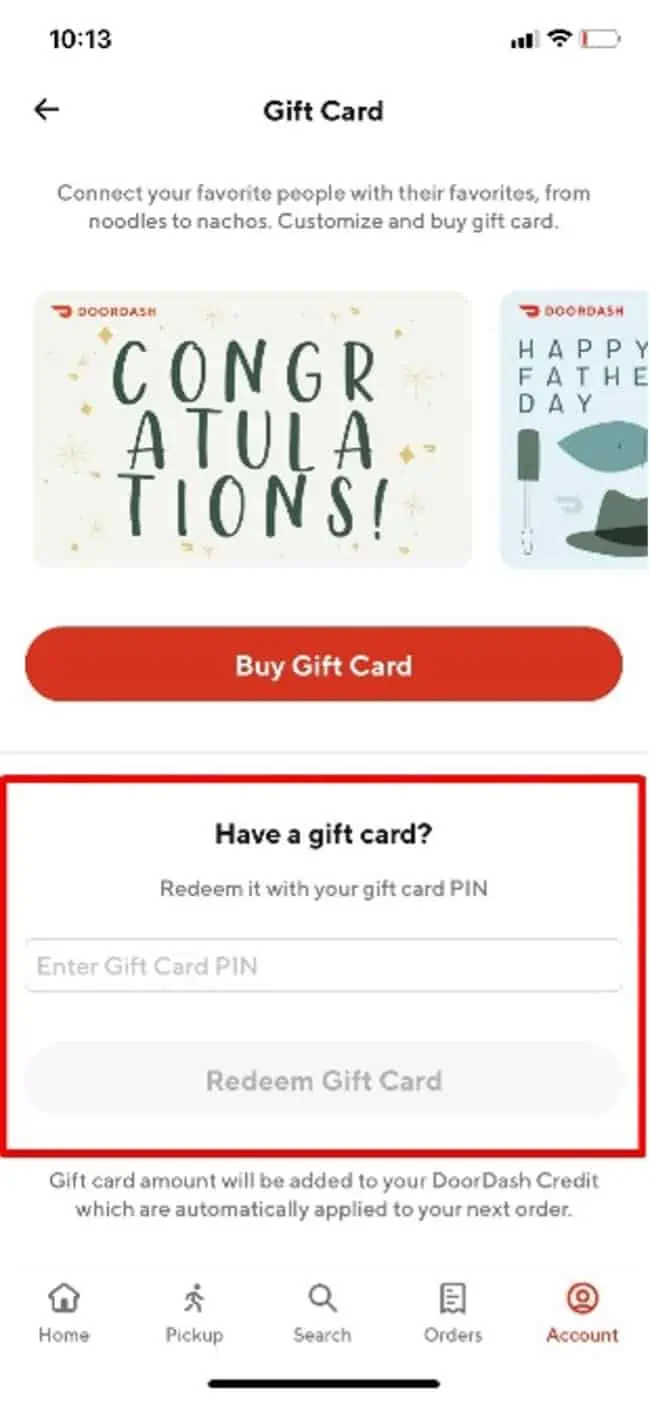
3. Enter the "Gift Card Pin"
4. Click "Redeem Gift Card"
5. Confirmation: The Gift Card amount will appear and the DoorDash credit will automatically apply to your next order.
DoorDash Gift Card Activation Guide
Step 1: Create an account or log in to the DoorDash app.
Step 2: Go to "Account" → "Gift Card".
Step 3: Enter the PIN of your gift card and click "Redeem Gift Card".
Restriction
You must be at least 18 years old, have an iPhone or Android smartphone, and complete the sign-up process. Q: What are the phone requirements to dash? A: Dashers can use their iOS or Android phones. Certain jailbroken or rooted phones may have trouble accessing the Dasher app
Terms & Policy
doordash.com
什么是 门冲
DoorDash 应用程序将您最喜欢的人与他们附近最好的地方联系起来,包括餐馆、便利店、杂货店、宠物用品等。从美国和加拿大 4,000 个城市的 310,000 多家本地和全国餐厅和商店中进行选择。送出分娩礼物可以让您所爱的人度过更轻松的夜晚、更快乐的日子,以及有更多时间享受他们所爱的人和事。
如何兑换
1. 单击左上角的菜单图标(3 条堆叠线)。
2. 点击“礼品卡”
3. 输入“礼品卡密码”
4. 点击“兑换礼品卡”
5. 确认:将显示礼品卡金额,DoorDash 积分将自动应用于您的下一个订单
限制
您必须年满 18 岁,拥有 iPhone 或 Android 智能手机,并完成注册过程。问:dash 对手机有什么要求?答:Dashers 可以使用他们的 iOS 或 Android 手机。某些越狱或获得 root 权限的手机可能无法访问 Dasher 应用程序
条款与政策
doordash.com
Related Products

