

Nintendo CA 25 CAD Game Card Canada
Buy Nintendo on UQUID using Bitcoin, Ethereum, USDT, USDC, Solana, TRON, Binance Pay, Gate Pay, Bybit Pay, Kucoin Pay and hundreds of other cryptocurrencies. UQUID provides instant digital delivery, secure crypto checkout, and easy worldwide redemption for gaming, shopping, entertainment, and mobile services...
Description
The perfect gift for anyone who loves to play. Choose from over 2,000 new, classic and indie games and don’t forget that downloadable content (DLC) to power-up your play experience. Delivered directly to your Nintendo Switch, Nintendo 3DS™ family of systems or Wii U™.----
Le cadeau parfait pour ceux qui aiment jouer. Choisissez parmi plus de 2000 jeux classiques, indépendants et nouveaux, sans oublier le contenu téléchargeable pour rehaussez votre expérience de jeu. Livré directement sur votre Nintendo Switch, les consoles de la famille Nintendo 3DS ™ ou la Wii U.
Redemption Instructions
1. Select Nintendo eShop on the HOME Menu to launch the Nintendo eShop.2. Select the account you want to use.
3. Select Enter Code on the left side of the screen.
4. Enter the 16-character download code.
* Some retailer cards for Nintendo Switch software will include both a Control Number and a Download Code. Make sure that you are entering the Download Code (usually begins with a B, no hyphens in the number) and not the Control Number (usually begins with an S, has hyphens).
* Any letters and symbols not used with prepaid codes (i.e. O, I, Z, commas, hyphens, etc.) will be disabled from the on-screen keyboard.
5. Select OK to confirm. The game will begin downloading once the code is confirmed.
* The game icon will appear on the HOME menu, with a download status bar. The status bar will disappear once the game download is complete.
-----
1. Sélectionnez Nintendo eShop dans le menu HOME pour ouvrir Nintendo eShop.
2. Choisissez le compte que vous voulez utiliser.
3. Sélectionnez Entrer le code à gauche de l'écran.
4. Saisissez le code de téléchargement à 16 caractères.
* Certaines cartes émises par des détaillants pour le logicielNintendo Switch comportent à la fois un numéro de contrôle et un code de téléchargement. Assurez-vous de saisir le code detéléchargement (il commence généralement par un B, sans tirets entre les chiffres), et non le code de contrôle (il commence généralement par un S, avec des tirets entre les chiffres).
* Les lettres et les symboles qui ne sont pas utilisés dans les codes prépayés (c.-à-d. O, I, Z, les virgules, les traits d'union, etc.) seront dé sactivés sur le clavier virtuel.
5. Sélectionnez OK pour confirmer. Le téléchargement du jeu commencera une fois le code confirmé.
* L'icône du jeu apparaîtra dans le menu HOME, avec une ligne de statut de téléchargement. La ligne de statut disparaîtra une fois le téléchargement du jeu terminé.
Terms of use
* If you haven’t already, set up an internet connection on your Nintendo* Switch system.
* Make sure your Nintendo Switch system has the latest system update.
* From the Nintendo Switch HOME Menu, select the Nintendo eShop icon.
* Select “Enter Code.”
* Enter your download code and click “OK.” To access the game, you can redeem this code using a Nintendo Account (“Account”) on Nintendo eShop or other Nintendo shopping services on or after the date that the game launches in your territory.
This code is non-refundable unless required by law and can only be used once. The game is non-transferable. Use of this code requires Internet access and acceptance of the user agreement applicable to Nintendo eShop where you use this code. Please review at support.nintendo.com before purchasing.
-----
* Si vous ne l'avez pas déjà fait, configurez une connexion Internet sur votre console Nintendo Switch.
* Assurez-vous que la console Nintendo Switch dispose de ladernière mise à jour.
* À partir du menu HOME de la Nintendo Switch, sélectionnez l'icône de l'eShop Nintendo.
* Sélectionnez «Saisir le code».
* Entrez votre code de téléchargement et cliquez sur «OK». Pour accéder au jeu, vous pouvez utiliser ce code en utilisant un compte Nintendo («Compte») sur Nintendo eShop ou d'autres services de magasinage Nintendo à la date de sortie du jeu sur votre te rritoire ou après.
Ce code n'est pas remboursable sauf si la loi l'exige et il peut être utilisé une fois seulement. Le jeu n'est pas remboursable. Pour utiliser ce code, vous devez avoir une connexion Internet et accepter le contrat du compte Nintendo qui s'applique à Nintendo eShop où vous utilisez ce code. Veuillez le consulter au support.nintendo.com avant de faire votre achat.
Nintendo
What is Nintendo
Nintendo eShop Card is a convenient way to virtually shop Nintendo stores. With this card you can safely and anonymously buy classic and new Nintendo games without using your credit card or bank account. Nintendo eShop Card can be used in conjunction with Wii U, Nintendo 3DS series.
The Nintendo Card is the perfect gift for anyone who loves to play.
It’s easy - apply it to your Nintendo eShop account in seconds.
It ensures that you’ll always have funds on hand for new games and applications.
It’s designed for security with your Nintendo eShop purchases - no credit card required.
How to redeem
A. How To Redeem?
1. Select Nintendo eShop on the HOME Menu to launch the Nintendo eShop.
2. Select the account you want to use.
3. Select Nintendo Switch Online on the left side of the screen.
4. Scroll down to Redeem Code and select Enter.
5. Enter the 16-digit download code for the Nintendo Switch Online membership, then select OK.
6. Download codes intended for use in the U.S., Canada, and Mexico cannot be used in countries in Latin America (and vice versa).
7. Make sure to review and accept any required terms that appear on the screen.
Any letters and symbols not used with prepaid codes (i.e. O, I, Z, commas, hyphens, etc.) will be disabled from the on-screen keyboard.
8. Select Confirm to redeem the code.
B. Nintendo Switch Key Activation
You will receive a digital 16-digit number once your Nintendo Switch Key purchase on Uquid has been completed. Here's what you need to know to activate a Nintendo Switch Key and start playing your favorite game.
1. Open the Nintendo website - http://ec.nintendo.com/redeem/#/

2. Sign in to your Nintendo Account.
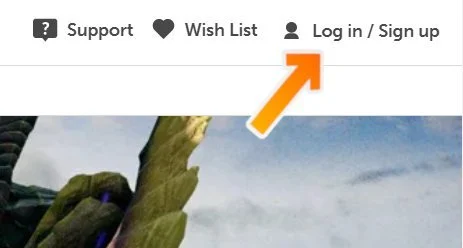
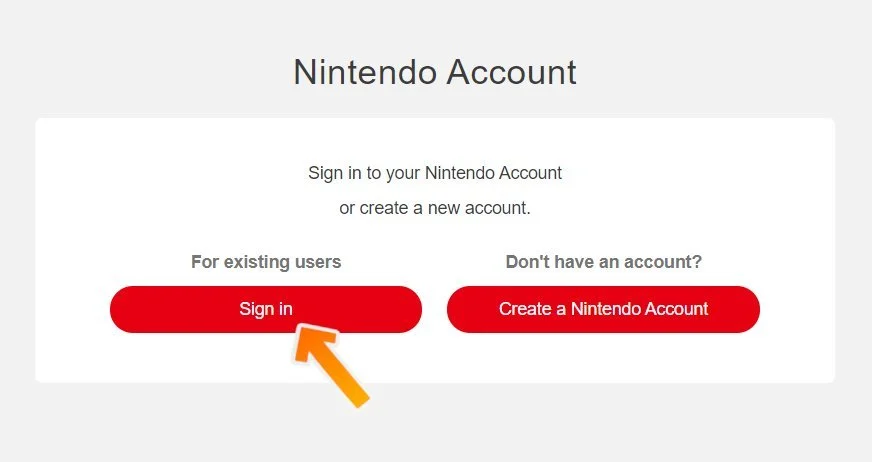
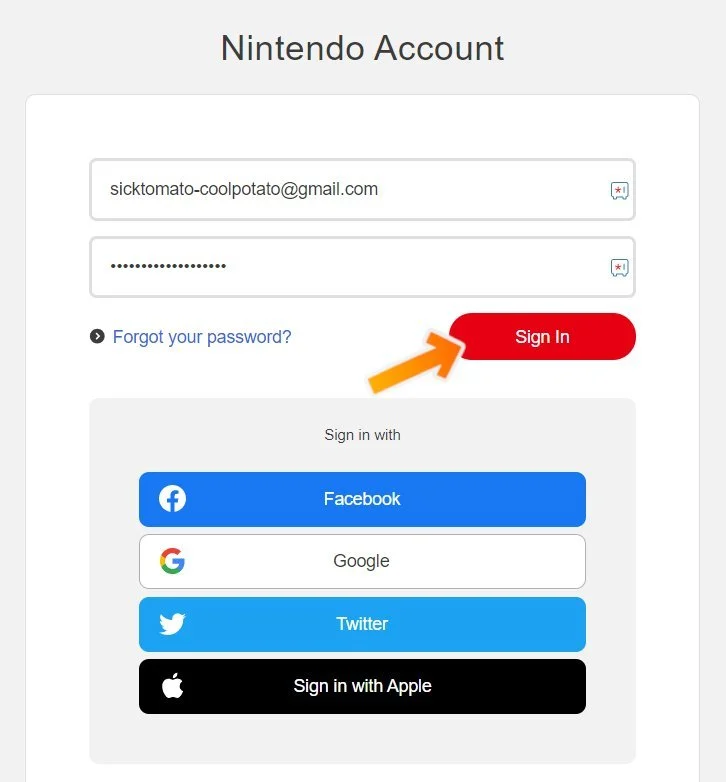
3. Simply paste the provided code you received into the designated area and click the "Next" button.
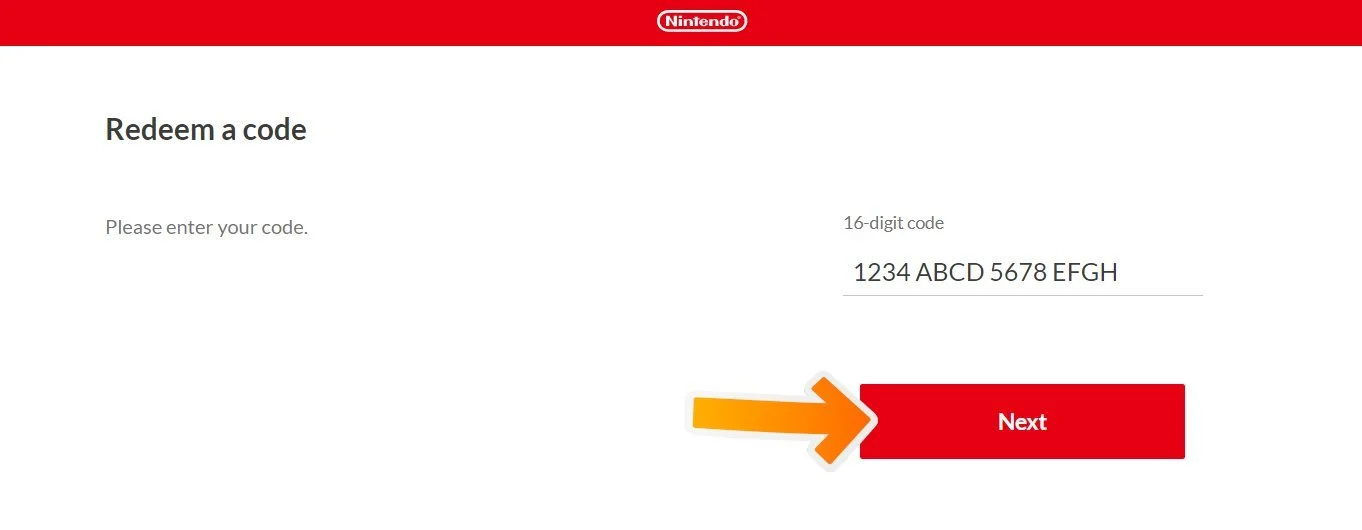
4. Re-enter your Nintendo Account password when prompted, then select "Redeem" to complete the process. Nintendo will then confirm your redemption, and your product will be added. Enjoy!
Restriction
Please note that each currency of this product can be redeemed only on accounts with the same currency. (e.g. EUR card on EUR balance account, USD on USD, etc.)
Terms & Policy
To use this card, you must have a wireless internet connection and agree to the network-related terms and conditions and privacy policies. You may also need to create or link a Nintendo Network ID
Brand Partner Contact:
https://www.nintendo.com
什么是 任天堂
Nintendo eShop Card 是虚拟购物 Nintendo 商店的便捷方式。使用此卡,您可以安全地匿名购买经典和新的任天堂游戏,而无需使用您的信用卡或银行账户。 Nintendo eShop Card 可与 Wii U、Nintendo 3DS 系列一起使用。
Nintendo Card 是送给任何喜欢玩游戏的人的完美礼物。
很简单 - 几秒钟内将其应用到您的 Nintendo eShop 帐户。
它确保您手头始终有资金购买新游戏和应用程序。
它专为确保您在 Nintendo eShop 购买时的安全性而设计 - 无需信用卡。
如何兑换
1. 在主页菜单中选择 Nintendo eShop 以启动 Nintendo eShop。
2. 选择您要使用的帐户。
3. 选择屏幕左侧的 Nintendo Switch Online。
4. 向下滚动到 Redeem Code,然后选择 Enter。
5. 输入 Nintendo Switch Online 会员的 16 位下载代码,然后选择确定。
6. 用于美国、加拿大和墨西哥的下载代码不能用于拉丁美洲国家(反之亦然)。
7. 确保查看并接受屏幕上出现的所有必需条款。
任何未与预付费代码一起使用的字母和符号(即 O、I、Z、逗号、连字符等)都将从屏幕键盘中禁用。
8. 选择确认兑换代码。
限制
请注意,该产品的每种货币只能在使用相同货币的账户上兑换。 (例如,欧元余额账户上的欧元卡、美元兑美元等)
条款与政策
要使用此卡,您必须具有无线互联网连接并同意与网络相关的条款和条件以及隐私政策。您可能还需要创建或链接任天堂网络 ID
品牌合作伙伴联系人:
https://www.nintendo.com
Related Products

